
Skip to content
Email: info@acanex.com
Login/Register
Teach on acanex
acanex.comacanex.com
  • Category
    • SEO & Marketing
  • Home
  • All Courses
  • Intructors
  • Pages
    • Dashboard
    • Blog
    • About Acanex
    • Contact Us
0

Currently Empty: CFA0.00


Continue shopping

Register as student
acanex.comacanex.com
  • Home
  • All Courses
  • Intructors
  • Pages
    • Dashboard
    • Blog
    • About Acanex
    • Contact Us

How Successful Students Use Technology to Learn Better in 2026

  • Home
  • Blog
  • How Successful Students Use Technology to Learn Better in 2026
Breadcrumb Abstract Shape
Blog

How Successful Students Use Technology to Learn Better in 2026

  • August 3, 2026
  • Com 0
Three smiling Black female students in smart red-and-white outfits using a laptop, tablet, smartphone, and notebook in a bright digital-learning environment.

Digital Learning: 

How Successful Students Use Technology to Learn Better in 2026

Full-bleed professional infographic illustration in 3:2 aspect ratio. Clean modern flat design with a light neutral background, subtle geometric accents, and strong visual hierarchy. Place a large bold heading at the top left reading "Introduction" in dark navy sans-serif font. Across the center and lower half, arrange three wide horizontal feature blocks in a clean three-column layout, each with a distinct circular icon on the left side of the block: a lightbulb icon, a book icon, and a forward arrow icon. Use soft blue, teal, and gold accent colors with matching small dividers and minimal shadows. Keep the composition open and spacious, with no vertical poster framing and no inset margins. Include no other text.

If You Want Better Grades, Start Here

Most students aren’t failing because they’re lazy. They’re just not using the right tools.

Student technology learning in 2026 looks nothing like it did five years ago. AI personalized learning for students has moved from experimental to everyday. Immersive learning technologies are showing up in college classrooms and living rooms alike. And flexible online learning models are making it possible to study around a job, a family, or literally any time zone.

This guide is for high school students, college learners, and self-taught adults who want to study smarter — not just harder.

Here’s what we’ll cover:

  • How AI adapts to the way you learn — and why that matters more than any textbook
  • Why immersive tools like VR and AR actually help you remember things — not just experience them
  • How data-driven academic performance tracking helps you spot weak spots before exam season hits

No fluff. Just the strategies real students are using right now to get ahead.

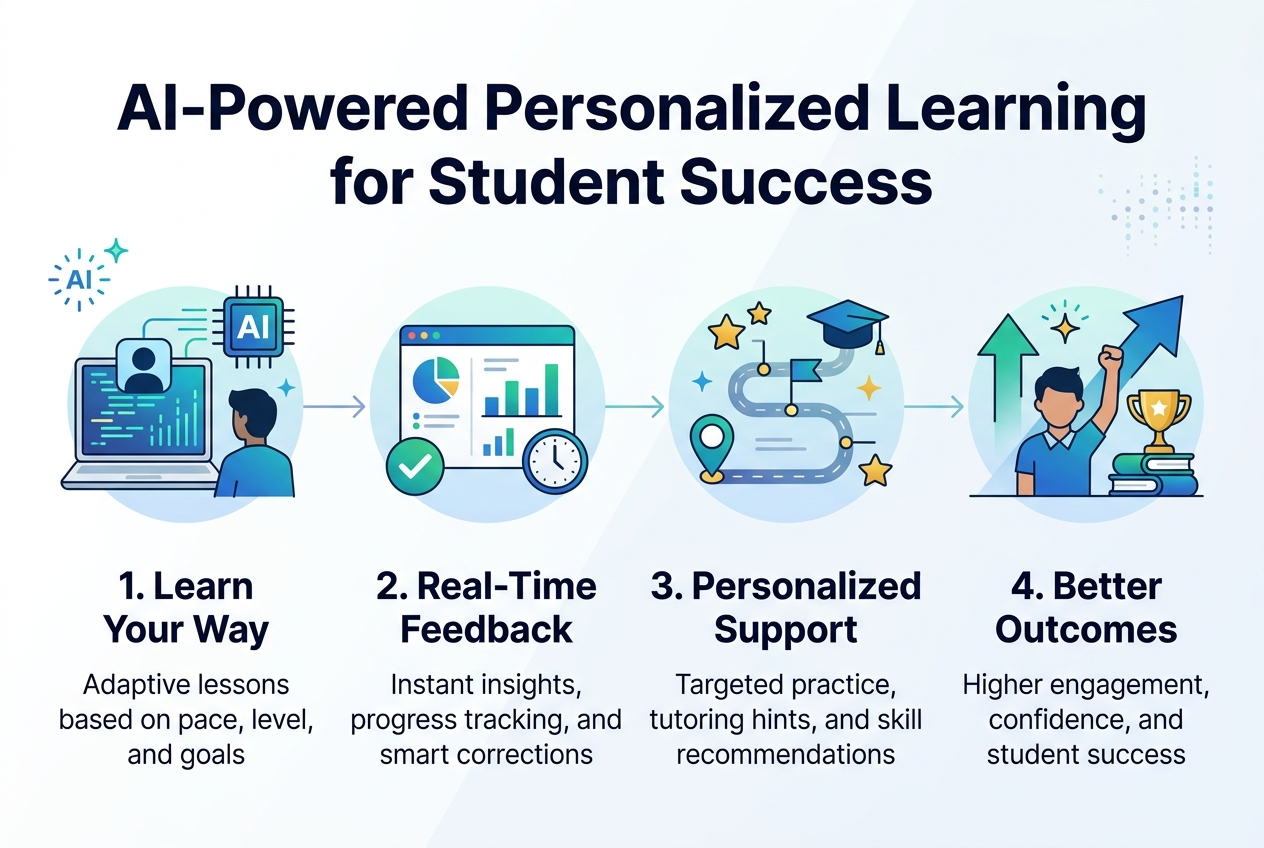
AI-Powered Personalized Learning for Student Success
digital-learning-how-successful-in-2026

How AI Platforms Adapt to Your Unique Learning Style

AI platforms like Squirrel AI and Microsoft’s Reading Coach analyze each learner’s strengths, weaknesses, and preferred learning styles to deliver truly personalized experiences. By tailoring content to individual pace and style, these systems ensure no student falls behind. The result? Stronger engagement, motivation, and retention — critical factors for AI personalized learning for students in 2026.

> According to Forbes, 60% of educators already use AI daily in their classrooms, with adoption rates continuing to climb.


Using AI Tools to Close Knowledge Gaps Faster

With this in mind, AI learning systems empower educators to identify and address knowledge gaps with precision. Rather than broad interventions, teachers can make targeted, data-informed decisions that accelerate student progress where it matters most.


AI-Assisted Content Creation to Access Better Study Materials

Now that we’ve covered personalization and gap-closing, consider how students use AI to study more effectively. Tools like ChatGPT, Synthesia, and LearntAI generate:

  • Customized lesson plans
  • Multimedia learning resources
  • Interactive quizzes

AI also curates content from diverse sources instantly, saving educators valuable time while keeping materials current, relevant, and high-quality — a true advantage for best learning technology for students today.

Immersive Technologies That Make Learning Stick
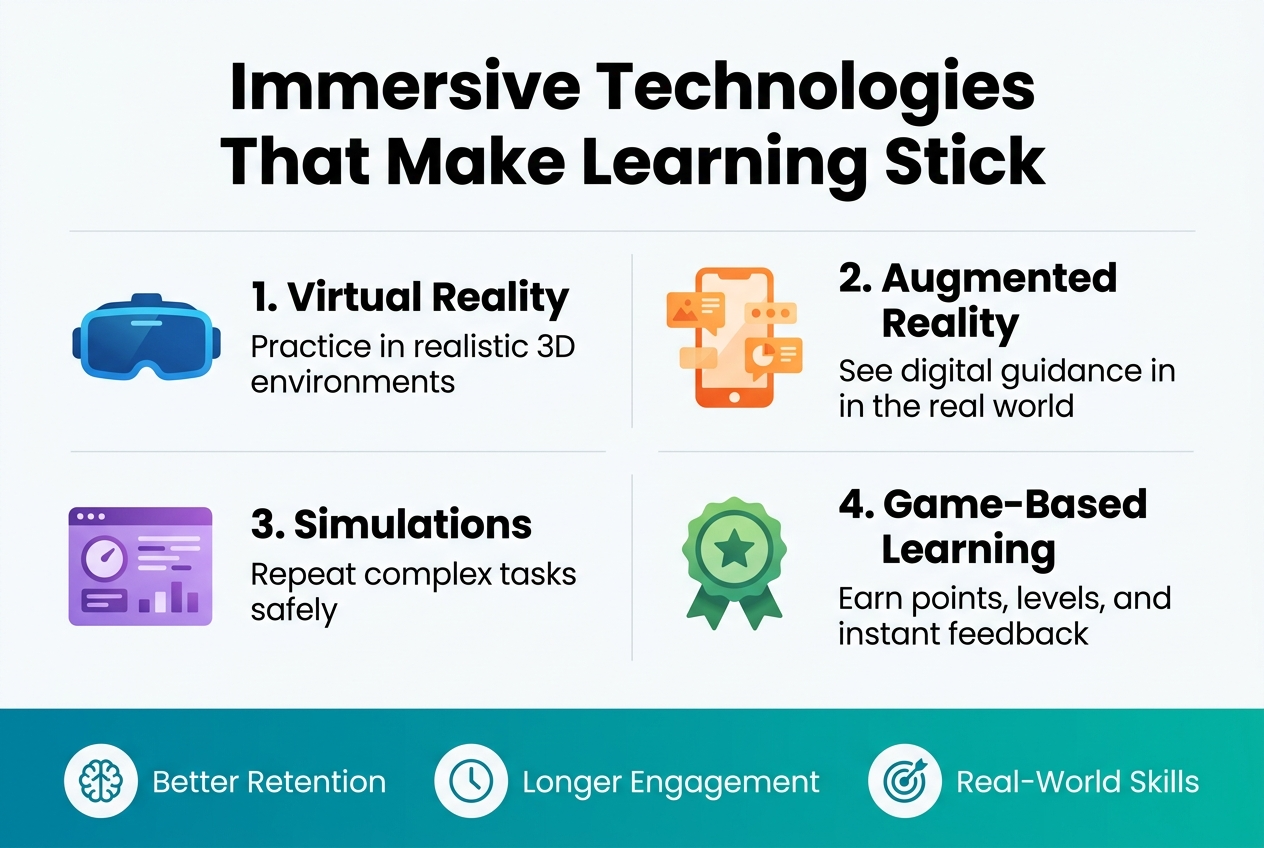
Full-bleed clean professional infographic in 3:2 aspect ratio, modern flat vector style, white background with teal, blue, purple, and orange accents, subtle gradients, crisp sans-serif fonts. Large bold heading across the top: "Immersive Technologies That Make Learning Stick".

Below the heading, arrange four wide horizontal sections in a two-by-two grid with clear numbered labels and icons:

1. Top left section: a blue VR headset icon and the text "1. Virtual Reality" with subtext "Practice in realistic 3D environments".
2. Top right section: an orange AR phone icon with floating overlay graphics and the text "2. Augmented Reality" with subtext "See digital guidance in the real world".
3. Bottom left section: a purple simulation dashboard icon with the text "3. Simulations" with subtext "Repeat complex tasks safely".
4. Bottom right section: a green gamification badge icon with the text "4. Game-Based Learning" with subtext "Earn points, levels, and instant feedback".

Add a wide bottom banner spanning the full width with three small circular icons and short labels: a brain icon with "Better Retention", a clock icon with "Longer Engagement", and a target icon with "Real-World Skills". Use clear spacing, strong visual hierarchy, bold section titles, lighter subtext, and balanced alignment.

A. VR and AR Experiences That Bring Subjects to Life

Immersive learning technologies are redefining what’s possible in modern education. With AR and VR, students no longer just read about history or biology — they experience it:

  • Walk through the streets of Ancient Rome on a virtual field trip
  • Explore complex anatomical structures in 3D, layer by layer
  • Practice real-world skills in a safe, risk-free digital environment

As hardware costs continue to drop, VR and AR adoption in classrooms is accelerating — making immersive learning technologies one of the most promising trends in student technology learning for 2026.


B. Gamification Tools That Boost Engagement and Motivation

With this in mind, engagement remains one of EdTech’s biggest challenges — and gamification is proving to be a powerful solution. Platforms like ClassDojo integrate gamified elements that transform passive learning into active participation:

Gamification Feature Benefit
Scavenger hunts Encourages exploration and curiosity
Competitive quizzes Reinforces knowledge retention
Leaderboards Motivates through healthy competition

These tools reshape digital learning engagement by making students want to participate — turning classroom time into an experience worth showing up for.

Flexible Learning Models That Fit Student Lifestyles
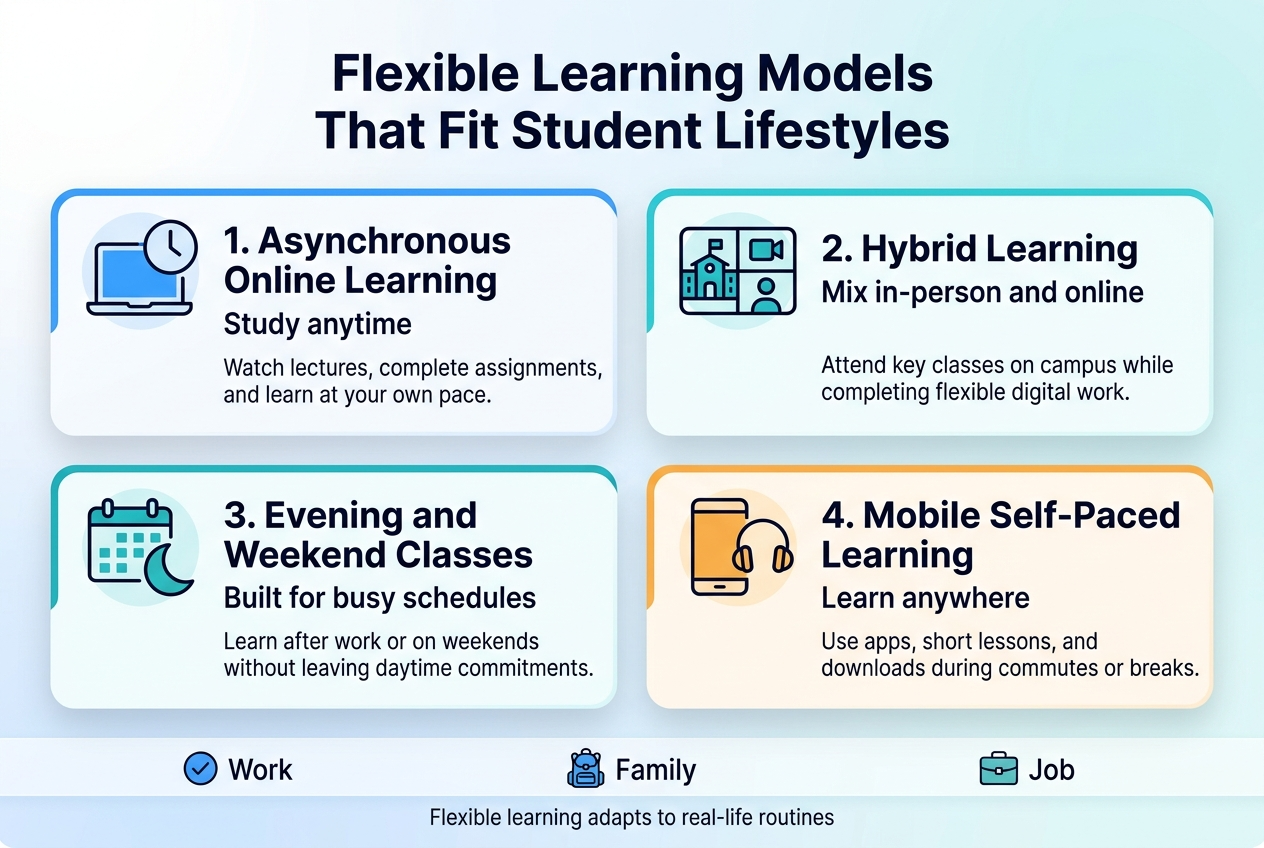
How Successful Students Use Technology

A. Hybrid Learning Strategies for Maximum Convenience

Flexible online learning models are reshaping how students engage with education. Hybrid learning blends in-person and online experiences, delivering the best of both worlds:

  • Anytime, anywhere access — students study on their own schedule
  • Diverse learning preferences — accommodates visual, auditory, and self-paced learners
  • Greater accessibility — reduces geographic and time-related barriers to education

This flexibility makes hybrid models one of the most effective approaches in student technology learning 2026, ensuring education fits around real student lifestyles rather than forcing students to fit rigid structures.


B. Microcredentials and Digital Badges to Fast-Track Career Goals

Now that we’ve covered hybrid strategies, it’s worth exploring how students validate what they learn. Microcredentials and digital badges are rapidly gaining traction as powerful alternatives to traditional certifications.

Feature Benefit
Skill-specific recognition Validates targeted competencies quickly
Dynamic showcasing Shareable on professional platforms
Flexible learning paths Aligned with individual career goals

As more institutions and employers adopt microcredentials, learners can pursue modular, career-focused education without committing to lengthy degree programs — making them ideal for fast-tracking professional growth.

Data-Driven Strategies to Improve Academic Performance
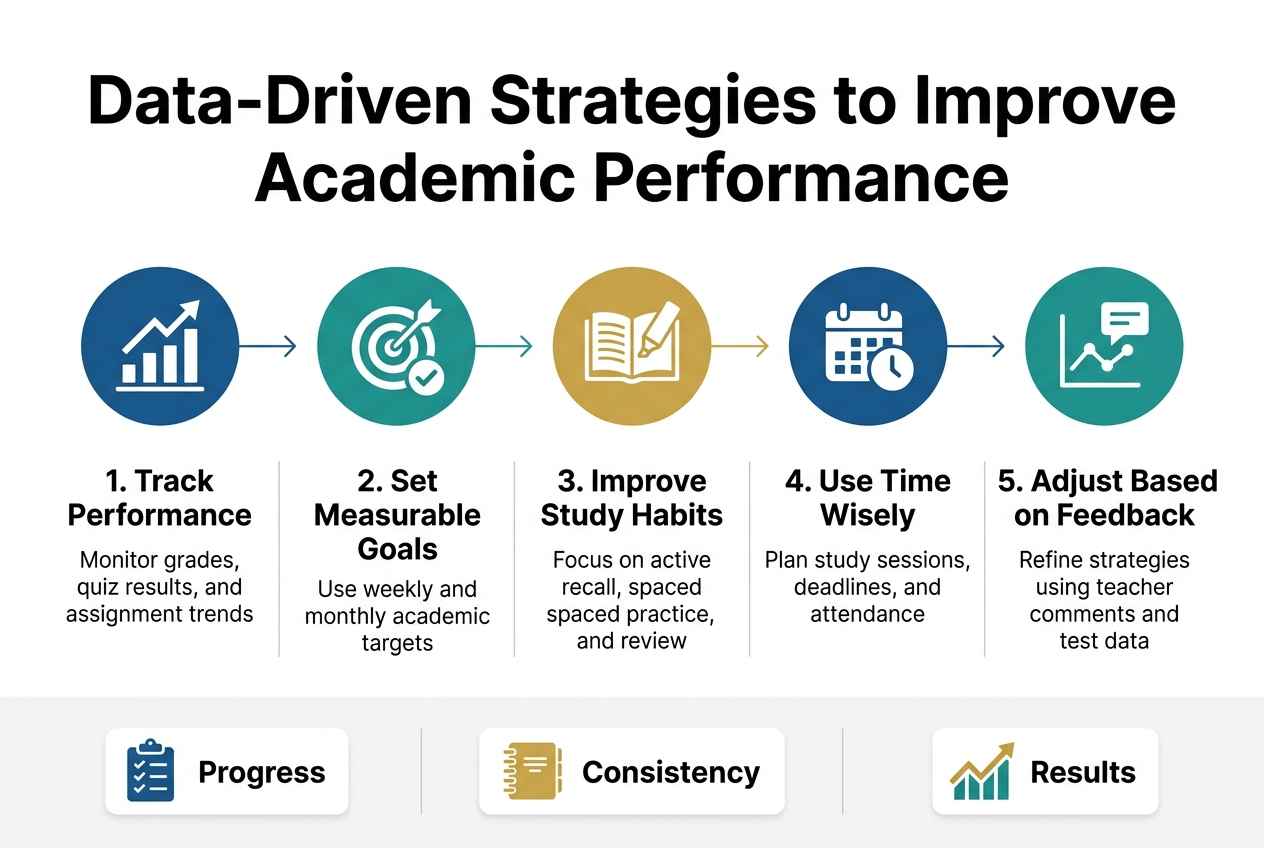
Full-bleed clean professional infographic in a 3:2 landscape aspect ratio, modern academic style, white background with deep blue, teal, and gold accents, sans-serif typography, clear visual hierarchy. Large bold title across the top: "Data-Driven Strategies to Improve Academic Performance". Under the title, a wide horizontal 5-step layout with evenly spaced numbered blocks across the center, using simple educational icons and concise labels.

Section 1 on the left: blue circular icon with a bar chart and upward arrow, heading text "1. Track Performance" and smaller text "Monitor grades, quiz results, and assignment trends".

Section 2 left-center: teal circular icon with a target and checkmark, heading text "2. Set Measurable Goals" and smaller text "Use weekly and monthly academic targets".

Section 3 center: gold circular icon with an open book and highlighter, heading text "3. Improve Study Habits" and smaller text "Focus on active recall, spaced practice, and review".

Section 4 right-center: blue circular icon with a calendar and clock, heading text "4. Use Time Wisely" and smaller text "Plan study sessions, deadlines, and attendance".

Section 5 on the right: teal circular icon with a line graph and feedback speech bubble, heading text "5. Adjust Based on Feedback" and smaller text "Refine strategies using teacher comments and test data".

Add a bottom horizontal band with three small metric cards: left card with a checklist icon and text "Progress", center card with a notebook icon and text "Consistency", right card with a rising graph icon and text "Results". Use subtle connectors or arrows between the five main blocks. Clean spacing, balanced wide composition, no frame, no borders, no clutter.

How Learning Analytics Help Students Stay on Track

Learning analytics involves collecting and analyzing student data across three key dimensions:

  • Performance – test scores, assignment grades, and progress benchmarks
  • Behaviors – attendance, engagement patterns, and participation rates
  • Outcomes – long-term academic results and course completion

This data fundamentally transforms how educators monitor student progress, enabling timely interventions before small struggles become significant setbacks. The 2024 EDUCAUSE Analytics Landscape Study confirms that analytics will be pivotal in shaping the future of digital learning, empowering educators to make informed, evidence-based decisions that directly improve data-driven academic performance.

Adaptive Teaching Insights That Personalize Your Support

With this in mind, the real power of analytics emerges through adaptive teaching. By drawing directly on learning analytics insights, educators can:

  • Identify which students need additional resources
  • Adjust instructional strategies to match individual learning needs
  • Deliver personalized support precisely when and where it matters most

This approach ensures every student receives targeted assistance tailored to their unique academic journey—rather than a one-size-fits-all solution. Now that we have covered how data shapes smarter teaching strategies, the next section explores how social and collaborative digital learning tools further strengthen student outcomes.

Social and Collaborative Tools That Enhance Learning Outcomes
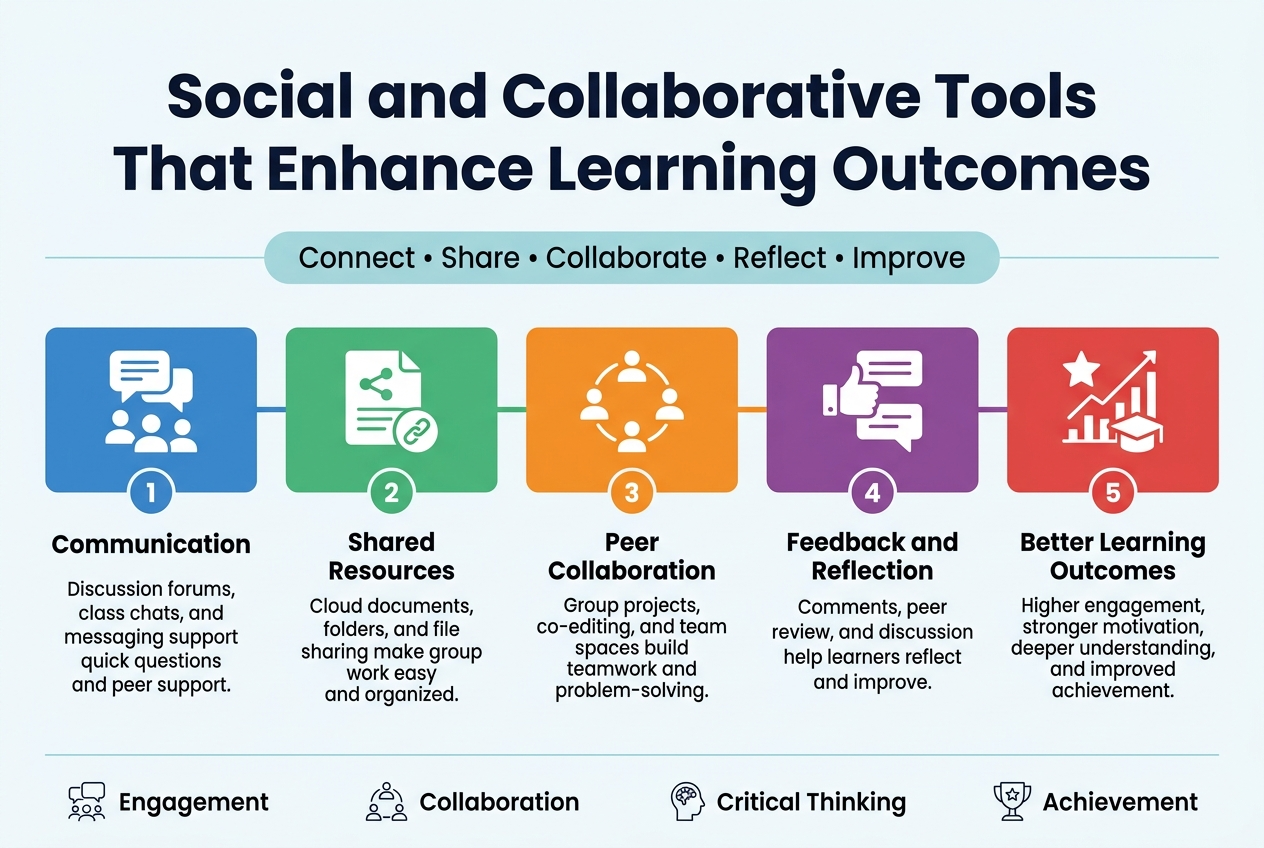
Aspect ratio 3:2, full-bleed professional infographic on a light clean background with subtle blue and teal accents. Large bold title at the top center in dark navy: "Social and Collaborative Tools That Enhance Learning Outcomes". Beneath the title, a wide horizontal subtitle strip with small text: "Connect • Share • Collaborate • Reflect • Improve".

Use a modern sans-serif font, strong visual hierarchy, crisp flat vector icons, and a clean multi-column layout across the wide canvas. Organize the content into five evenly spaced horizontal sections with colored blocks and numbered badges.

Section 1 on the left: a blue block with a speech bubble and user icons, numbered badge "1", heading text: "Communication", body text: "Discussion forums, class chats, and messaging support quick questions and peer support."

Section 2 next to it: a green block with a shared document and link icon, numbered badge "2", heading text: "Shared Resources", body text: "Cloud documents, folders, and file sharing make group work easy and organized."

Section 3 in the center: an orange block with a circle of connected people icon, numbered badge "3", heading text: "Peer Collaboration", body text: "Group projects, co-editing, and team spaces build teamwork and problem-solving."

Section 4 next to it: a purple block with a thumbs-up and comment icon, numbered badge "4", heading text: "Feedback and Reflection", body text: "Comments, peer review, and discussion help learners reflect and improve."

Section 5 on the right: a red block with a star, progress chart, and graduation cap icon, numbered badge "5", heading text: "Better Learning Outcomes", body text: "Higher engagement, stronger motivation, deeper understanding, and improved achievement."

Add a simple bottom row with four small icon-label callouts spanning the width: "Engagement", "Collaboration", "Critical Thinking", "Achievement". Use subtle connecting lines between sections to show flow from left to right. Keep spacing balanced, polished, and readable, with no border frame and no extra text.

Peer-to-Peer Learning Platforms That Build Community

One of the most significant challenges in digital education is social isolation. Collaborative digital learning tools directly address this by creating structured opportunities for learners to connect meaningfully. Peer-to-peer learning platforms build genuine community by enabling students to:

  • Share knowledge and support each other’s progress
  • Collaborate directly with both peers and educators
  • Engage consistently within a connected learning network

These environments transform solitary screen time into shared academic experiences, fostering belonging alongside achievement.

Discussion Forums and Group Projects That Deepen Understanding

With this in mind, next, we’ll see how specific platform features translate community into measurable outcomes. Discussion forums encourage students to articulate ideas, challenge assumptions, and refine thinking — all of which deepen conceptual understanding.

Group projects extend this further by requiring coordination, accountability, and shared problem-solving. Together, these features:

Feature Learning Benefit
Discussion Forums Encourages critical thinking and peer feedback
Group Projects Builds collaboration and real-world skills
Peer-to-Peer Learning Reinforces understanding through teaching others

By integrating these tools, social learning platforms maximize outcomes by fostering environments built on connection, collaboration, and sustained engagement — essential pillars of student technology learning 2026.

Secure and Trustworthy Digital Learning Environments
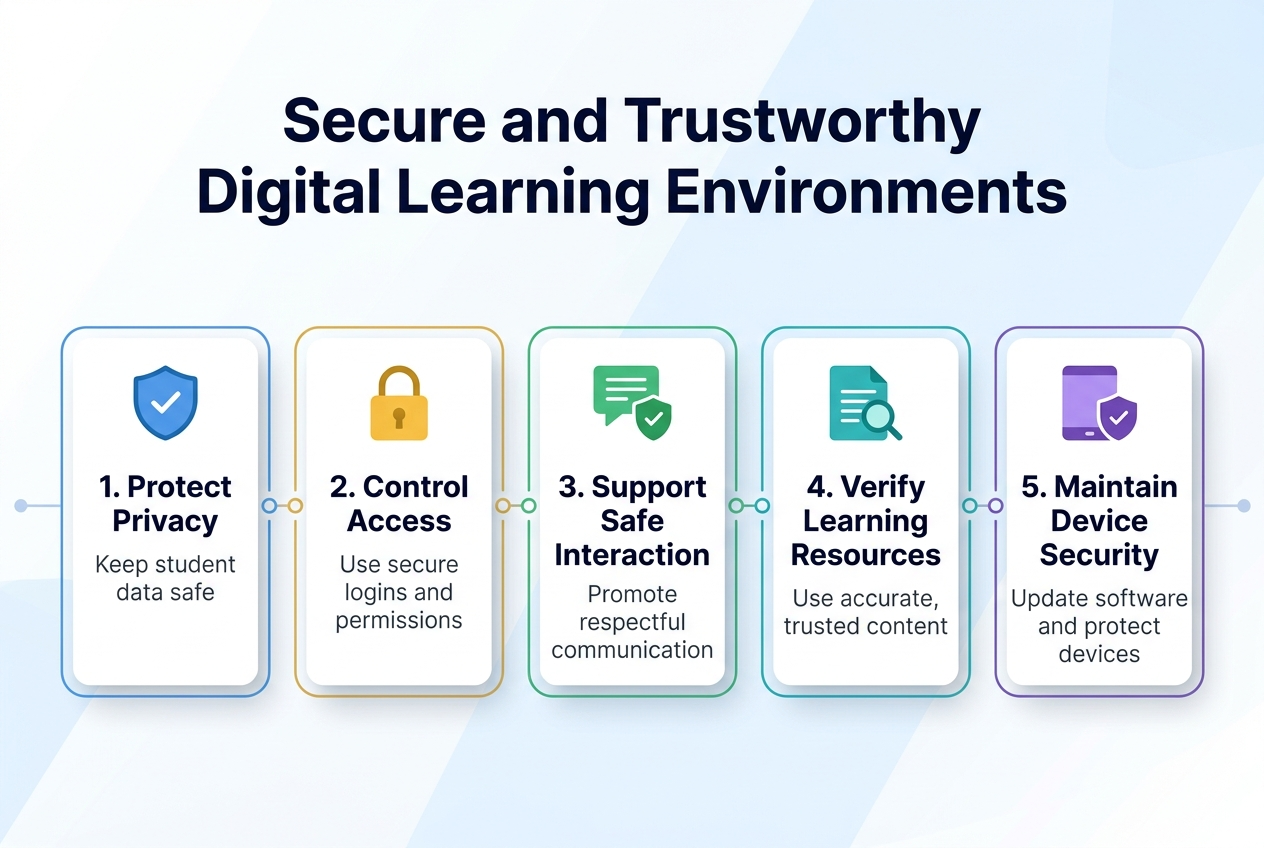
Full-bleed wide infographic illustration in 3:2 aspect ratio, clean professional modern flat design, white background with subtle light blue gradients and soft geometric shapes, no frame, no inset margins.

Top center: large bold heading in dark navy text: "Secure and Trustworthy Digital Learning Environments"

Below the heading, a wide horizontal layout with five evenly spaced sections across the canvas, each in a rounded rectangle card with light blue outline, subtle shadow, and a distinct icon at the top of each card.

Section 1 on the left: a blue shield icon with a checkmark. Text in bold: "1. Protect Privacy" Smaller text beneath: "Keep student data safe"

Section 2 left-center: a gold lock icon. Text in bold: "2. Control Access" Smaller text beneath: "Use secure logins and permissions"

Section 3 center: a green chat bubble icon with a safety badge. Text in bold: "3. Support Safe Interaction" Smaller text beneath: "Promote respectful communication"

Section 4 right-center: a teal document icon with a magnifying glass. Text in bold: "4. Verify Learning Resources" Smaller text beneath: "Use accurate, trusted content"

Section 5 on the right: a purple device icon with a security shield. Text in bold: "5. Maintain Device Security" Smaller text beneath: "Update software and protect devices"

Add a thin connecting line running horizontally through the section cards, with small circular markers between them. Use a clear visual hierarchy, bold navy headings, smaller gray body text, and accent colors of blue, gold, green, teal, and purple. Minimal educational icons, balanced spacing, modern sans-serif font, crisp infographic layout.

How Blockchain Protects and Validates Your Academic Records

Blockchain technology is reshaping how academic credentials are stored and verified. It creates a tamper-proof digital ledger that ensures:

  • Integrity — Records cannot be altered or falsified
  • Fraud prevention — Institutions and employers can trust credential authenticity
  • Simplified validation — Credential verification becomes faster and more reliable for employers and academic institutions alike

This transparent, decentralized approach makes secure digital learning environments a realistic standard rather than an aspiration.


Cybersecurity Practices That Keep Student Data Safe

With this in mind, protecting sensitive student data is equally critical. The EdTech industry has made cybersecurity a top priority, investing in robust measures that include:

Security Practice Purpose
Advanced Encryption Protects data during transmission and storage
Multi-Factor Authentication Prevents unauthorized account access
Threat Detection Tools Identifies and neutralizes breaches proactively

These layered defenses work together to safeguard digital learning environments against evolving cyber threats. As student technology learning continues advancing through 2026, EdTech providers are committed to building platforms where students and educators can engage confidently, knowing their data remains protected at every level.

Overcoming Barriers to Technology-Enhanced Learning
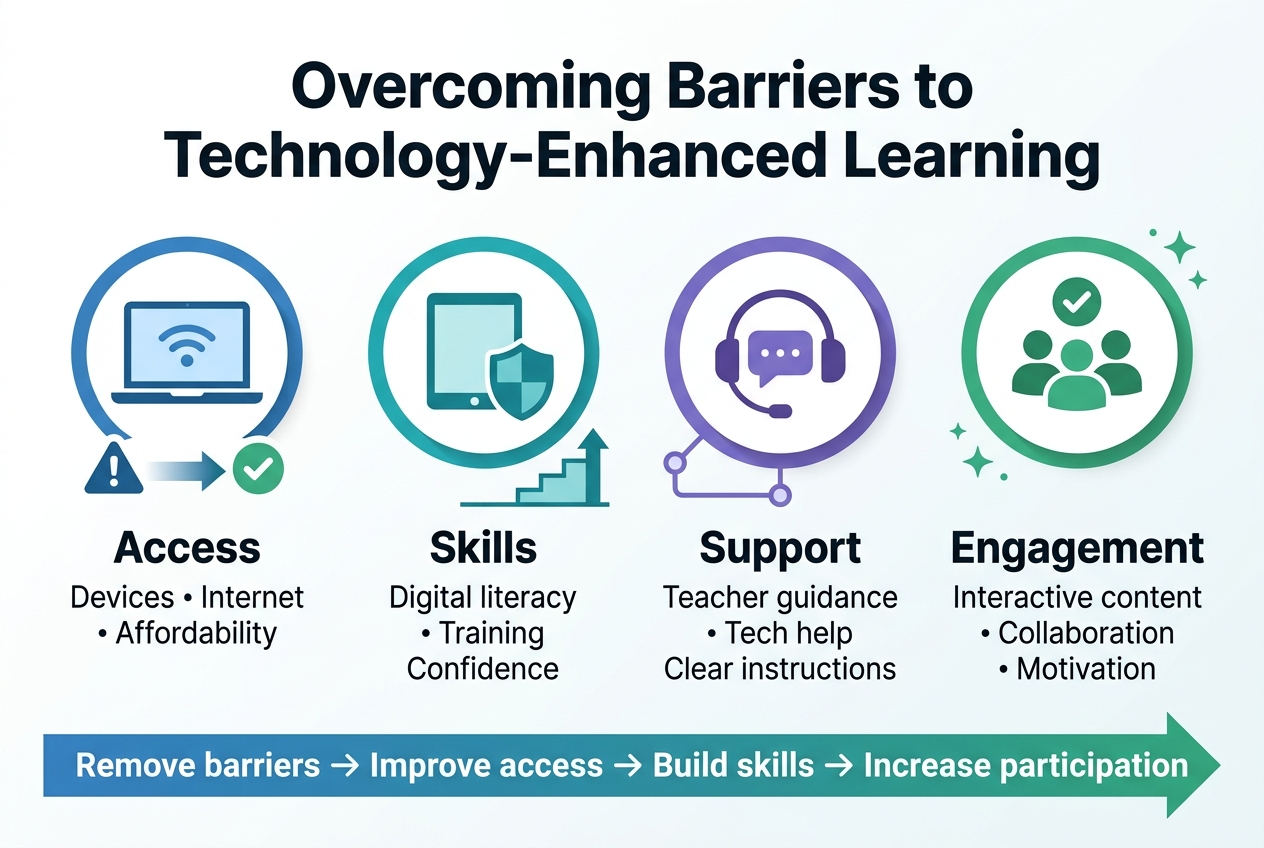
Create a clean, professional full-bleed infographic in a 3:2 aspect ratio with a modern flat-vector style, blue-teal-purple color palette with white background, subtle gradients, and clear visual hierarchy. Add a bold top heading centered across the width: "Overcoming Barriers to Technology-Enhanced Learning". 

Below the heading, use a wide horizontal 4-section layout with evenly spaced blocks across the canvas, not a narrow vertical stack. Each block should have a colored icon at the top, a short bold subheading, and one or two short support lines beneath.

Section 1 on the left: a laptop and Wi‑Fi icon inside a blue circle. Text: "Access" and below it "Devices • Internet • Affordability". Include a small barrier symbol (warning triangle) fading into a green checkmark.

Section 2 left-center: a tablet and shield icon inside a teal circle. Text: "Skills" and below it "Digital literacy • Training • Confidence". Include a simple step-up arrow or learning curve graphic.

Section 3 right-center: a headset and chat bubbles icon inside a purple circle. Text: "Support" and below it "Teacher guidance • Tech help • Clear instructions". Include a support network line graphic linking to the icon.

Section 4 on the right: a group of people with a checkmark icon inside a green circle. Text: "Engagement" and below it "Interactive content • Collaboration • Motivation". Include small spark or star accents.

Across the bottom, add a wide banner strip with a left-to-right arrow flow connecting the four sections and the text: "Remove barriers → Improve access → Build skills → Increase participation". Use bold sans-serif fonts for headings and smaller clean sans-serif fonts for body text. Use crisp icons, subtle shadows, balanced spacing, and high contrast for readability.

Bridging the Digital Divide for Equal Access to EdTech

Overcoming barriers to technology-enhanced learning starts with addressing unequal access. The digital divide remains a significant challenge, particularly in underserved communities where infrastructure for advanced technologies is limited. Without resolving this gap, student technology learning in 2026 risks leaving vulnerable populations further behind.

Key access barriers include:

  • Limited internet connectivity
  • Lack of personal devices
  • Insufficient institutional support in low-income areas

Building Digital Literacy Skills to Use Technology Effectively

With this in mind, access alone isn’t enough. Educators require ongoing professional development to integrate digital tools effectively into their teaching practice. Without proper training and support, even the best learning technology for students goes underutilized.

Priorities for building digital literacy:

  • Continuous teacher training programs
  • Structured onboarding for new EdTech tools
  • Sustained institutional support systems

Navigating AI Ethics for Responsible and Unbiased Learning

Now that we’ve covered access and literacy, another critical barrier emerges: AI ethics. As AI personalized learning for students becomes more prevalent, concerns around bias and transparency are growing. Educators and EdTech companies must collaboratively:

  • Identify and eliminate algorithmic bias
  • Ensure transparency in AI-driven decisions
  • Develop responsible frameworks for ethical EdTech use

Recent  inspirational and case studies with internal linkings urls
3:2 landscape infographic, full-bleed modern professional design with a clean white background, deep blue and teal accent colors, subtle gray dividers, bold sans-serif typography. Large bold heading across the top left: "Recent inspirational and case studies with internal linkings urls". 

Below the heading, create a wide three-column layout with connected sections and clear visual hierarchy:
Left section: a blue circular icon with a lightbulb and spark lines, title text "Inspirational Case Studies", and three short numbered blocks beneath it labeled "01", "02", "03" with small checkmark icons.
Center section: a teal circular icon with a document and magnifying glass, title text "Recent Case Studies", and a horizontal timeline with three milestone markers and labels "Case 1", "Case 2", "Case 3".
Right section: a navy circular icon with a chain link symbol, title text "Internal Linking URLs", and a stacked list of three URL-style lines: "URL 1", "URL 2", "URL 3", each inside rounded rectangles with link icons.

Add thin connecting lines between the three sections, small arrow markers, and subtle geometric shapes for a polished corporate infographic look. Use generous spacing, wide horizontal composition, and balanced alignment with the heading at the top and the three sections centered across the lower two-thirds of the image.

Real Students, Real Results

These stories show how student technology learning in 2026 is already changing lives.

AI Personalized Learning in Action

A community college in Ohio rolled out an AI personalized learning platform for remedial math students. Within one semester, pass rates jumped from 54% to 78%. The AI flagged struggling students early and adjusted practice problems daily based on individual progress.

Immersive Learning That Clicked

A high school in Singapore used VR labs for biology dissections. Students who used the immersive learning tools scored 22% higher on practical exams than the previous cohort using traditional methods.

Flexible Learning Models Paying Off

Student Profile Challenge Solution Outcome
Working parent, 34 No fixed schedule Async online modules Completed degree in 18 months
Rural student, 19 Poor internet access Offline-first app 91% course completion rate
Student with dyslexia Reading-heavy content AI audio summaries GPA improved by 0.8 points

Collaborative Tools Building Community

A UK university introduced collaborative digital learning tools for group projects. Student satisfaction scores hit an all-time high, with 88% saying they felt more connected to classmates than in traditional seminars.
Create a clean professional infographic illustration in a 3:2 aspect ratio, full-bleed layout with no frame or inset margins. Use a modern white background with deep navy, teal, and soft gold accents.

At the top center, place a large bold heading in a sans-serif font: "Conclusion".

Below the heading, arrange three wide horizontal sections across the middle of the canvas, evenly spaced from left to right, using a balanced multi-column layout.

Section 1 on the left: a rounded rectangle block with the number "01" in a teal circle at the top-left of the block, a simple blue checkmark icon beside it, and subtle horizontal accent lines inside the block.

Section 2 in the center: a rounded rectangle block with the number "02" in a gold circle at the top-left of the block, a simple navy summary icon made of three stacked lines and a small dot, and subtle horizontal accent lines inside the block.

Section 3 on the right: a rounded rectangle block with the number "03" in a teal circle at the top-left of the block, a simple blue flag icon, and subtle horizontal accent lines inside the block.

Add a thin gold line connecting the three sections along their lower edges for visual flow. Use soft shadows, crisp vector shapes, and plenty of white space. Keep the composition polished, minimal, and executive-style with clear visual hierarchy.

The way successful students learn in 2026 looks nothing like it did just a few years ago. From AI-powered personalized learning and immersive VR/AR experiences to flexible hybrid models, learning analytics, and social collaboration tools, technology has become a core part of how students study, grow, and achieve. Secure digital environments backed by blockchain and strong cybersecurity measures ensure that learning happens safely, while ongoing efforts to close the digital divide are making these tools more accessible to students everywhere.

The opportunities ahead are real and within reach. Whether you are a student looking to sharpen your skills or an educator aiming to improve learning outcomes, the tools and strategies covered in this post offer a clear path forward. The EdTech market is growing fast, experts agree that AI and personalized learning are here to stay, and the students who embrace these innovations today will be the ones who succeed tomorrow. Start small, stay curious, and let technology work for you.

Tags:
academic achievementacademic successAI in educationcollaborative learningdigital educationDigital Learningdigital skillsE-LearningEdTecheducational technologyeffective studyingfuture of educationlearning in 2026learning strategieslearning technologymodern studentsOnline Learningonline study toolsstudent productivitystudent successstudy smarterstudy tipstechnology in educationuniversity students
Share on:
From Distraction to 100% Distinction: Mastering Digital Learning in 2026
How to score 11 A grades and 5 A grades in GCE O/L and A/L in Cameroon 2026

Leave a Reply Cancel reply

Your email address will not be published. Required fields are marked *

Latest Post

Thumb
How to score 11 A grades and
August 3, 2026
Thumb
How Successful Students Use Technology to Learn
August 3, 2026
Thumb
From Distraction to 100% Distinction: Mastering Digital
August 3, 2026

Categories

  • Blog

Get online courses with acanex. Including GCE O and A Levels

Tags

academic success affiliate marketing AI freelancing AI in education best microphone 2026 content creator tools digital education Digital Learning digital marketing digital skills E-Learning educational technology effective studying financial freedom focus techniques freelance writing freelancing in 2026 lavalier mic learning in 2026 learning strategies make money online online business online business ideas online freelancing online income ideas Online Learning passive income passive income ideas portable microphone remote income remote work SEO content strategy SEO growth hacks SEO trends 2026 social media manager student productivity student success study motivation study smarter study tips virtual assistant jobs wireless microphone work from anywhere work from home work from home jobs

Latest Post

Thumb
How to score 11 A grades and
August 3, 2026
Thumb
How Successful Students Use Technology to Learn
August 3, 2026
Thumb
From Distraction to 100% Distinction: Mastering Digital
August 3, 2026

Categories

  • Blog

Tags

academic success (3) affiliate marketing (2) AI freelancing (2) AI in education (2) best microphone 2026 (2) content creator tools (2) digital education (2) Digital Learning (3) digital marketing (4) digital skills (3) E-Learning (2) educational technology (3) effective studying (2) financial freedom (3) focus techniques (2) freelance writing (2) freelancing in 2026 (2) lavalier mic (2) learning in 2026 (2) learning strategies (3) make money online (6) online business (5) online business ideas (3) online freelancing (3) online income ideas (2) Online Learning (3) passive income (5) passive income ideas (2) portable microphone (2) remote income (2) remote work (4) SEO content strategy (2) SEO growth hacks (2) SEO trends 2026 (2) social media manager (2) student productivity (2) student success (4) study motivation (3) study smarter (3) study tips (3) virtual assistant jobs (2) wireless microphone (2) work from anywhere (2) work from home (3) work from home jobs (2)

acanex

https://acanex.com/wp-content/uploads/2026/03/acanexbusiness-video.mp4

acanex online education.

online students

acanex, the future of online education

Teacher

Ready to give the best to our subscribers

Best Online Learning Platforms in Cameroon – Acanex staff helping students with online courses, exam preparation, and certifications in a flexible learning environment in 2026.

Calender

August 2026
M T W T F S S
 12
3456789
10111213141516
17181920212223
24252627282930
31  
« May    

Join acanex to an exciting digital future

acanex logo3

Experience education without limits. Dynamic online learning built for today’s fast-paced world.

Add: Yaounde_Cameroon
Call:
Email: info@acanex.com

Online Platform

  • All Intructors
  • Contact Us
  • About Acanex
  • User Account
  • Reset Password
  • Forgot Password

Links

  • User Login
  • User Register
  • My account
  • Checkout
  • Cart
  • Instructor Registration

Social Media

Enter your email address to register to our newsletter subscription

Icon-facebook Icon-linkedin2 Icon-instagram Icon-twitter Icon-youtube Tiktok
Copyright 2026 _acanex_All Rights Reserved
acanex.comacanex.com
Sign inSign up

Sign in

Don’t have an account? Sign up
Lost your password?

Sign up

Already have an account? Sign in